

Chapter-2
ALGORITHM, FLOW CHART AND PSEUDO CODE
What is Algorithm?
A set of instruction which describes the steps to be followed to carry out an activity is called an algorithm or procedure for solving a problem. If the algorithm is written in the computer’s programming language then such a set of instruction is called a program.
We can view an algorithm as a way to solve a problem or in other words, as a set of direction, that tell us exactly how to go about for getting the desired result.
In mathematics and computer science, an algorithm is a finite sequence of well-defined, computer-implementable instructions, typically to solve a class of problems or to perform a computation.
In simple words we can say an algorithm is a set of step-by-step procedures, or a set of rules to follow, for completing a specific task or solving a particular problem
Example:
We can use following steps or actions to reach the office by 10 AM.
Action:
- Get ready by 8 AM.
- Take breakfast
- Board the chartered bus at 9 AM.
- Read office at 10 AM.
Definition of algorithms
We can define an algorithm as an order sequence of well-defined and effective operation that, when executed, will always produce the desired result and terminate in a finite amount of time.
An algorithm must always one clearly understood starting point and one or more clearly understood ending points. The starting point should START and ending point should STOP.
What is Flow Chart?
A flowchart is a graphical representation of the sequence of operations in an information system or program. Program flowcharts show the sequence of instructions in a single program or subroutine. Since a flowchart shows the flow of operations in pictorial form, any error in the logic of the procedure can be detected easily.
Flow Chart Symbols
- Processing
A processing symbol is used in a flowchart to represent arithmetic and data movement instructions.

- Flow lines
Flow lines with arrowheads are used to indicate the flow of operation, that is, the exact sequence in which the instructions are to be executed.

- Decision
The decision symbol is used in a flowchart to indicate a point at which a decision has to be made and a branch to one of two or more alternative points is possible.

Terminal (Begin / End)
This symbol is used to start or end a flowchart.

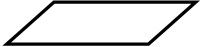
Input / Output
This symbol is used to denote any kind of input or output.
Connector
If a flowchart becomes very long, the flow lines start crisscrossing at many places that causes confusion and reduces the clarity of the flowchart.

Rules for Writing Flowcharts
- First formulate the main line of logic, and then incorporate the details in the flowchart.
- Maintain a consistent level of detail for a given flowchart.
- Do not give every detail on the flowchart. A reader who is interested in greater details can refer to the program itself.
- Words in the flowchart symbols should be common statements and easy to understand.
- Be consistent in using names and variables in the flowchart.
- Go from left to right and top to bottom in constructing the flowchart.
- Keep the flowchart as simple as possible. The crossing of flow lines should be avoided as far as possible.
- If a new flowcharting page is needed, it is recommended that the flowchart be broken at an input or output point. Moreover, properly labeled connectors should be used to link the portions of the flowchart on different pages.
Question for algorithms and flow chart
- Write an algorithm and flow chart to add two Nos.
- Write an algorithm and flow chart to add any three Nos.
- Write an algorithm and flow chart to subtract any two Nos.
- Write an algorithm and flow chart to multiply any two Nos.
- Write an algorithm and flow chart to divide any two Nos.
- Write an algorithm and flow chart to find the reminder.
- Write an algorithm and flow chart to find the square of a No.
- Write an algorithm and flow chart to find the power.
- Write an algorithm and flow chart to find the average between 4 Nos.
- Write an algorithm and flow chart to calculate simple interest.
- Write an algorithm and flow chart to find greater among two Nos.
- Write an algorithm and flow chart to find greater among three Nos.
- Write an algorithm and flow chart to find greater among four Nos.
- Write an algorithm and flow chart to test a No. is +ve or –ve.
- Write an algorithm and flow chart to test a No. is Even or Odd
- Write an algorithm and flow chart to test pythagorious theorem.
- Write an algorithm and flow chart to test a No. is +ve or –ve.
- What is Pseudocode?
Pseudocode (pronounced SOO-doh-kohd) is an outline of a program written in a form that can easily be converted into real programming statements. Pseudocode is an artificial programming language that allows computer programmers to develop logic before executing a particular code. It can be defined as the blueprint of a code, which details a step of actions (or the procedure) and the order in which the steps are to be executed.
Pseudocode is a type of structured English that defines program algorithms. It allows programs to focus on algorithms core logic before setting it in formal programming syntax. Pseudocde is not executable on a computer. Instead, it helps a programmer design code before its actual implementation.
The main purpose of pseudocode is to describe clearly what a code (or program) is supposed to do. It breaks down a code into steps and highlights their sequence of action. Pseudocode allows coders and programmers to dry-run a code to check for errors and inconsistencies before writing it in a programming language.
Purpose
The main purpose of pseudocode is to describe clearly what a code (or program) is supposed to do. It breaks down a code into steps and highlights their sequence of action. Pseudocode allows coders and programmers to dry-run a code to check for errors and inconsistencies before writing it in a programming language.
Rules
Pseudocode is composed of sentences, clauses and words. It follows a structured pattern, with statements written in a sequential order. Pseudocode uses selection statements (if, then and if, then, else), and the initial keyword in each statement needs to be capitalized. It requires one statement per sentence, which need to be indented to show code hierarchy.
Example
M = 10
N = 5
(where M and N are variables)
IF (M >= N) Then
Statement 1
Else
Statement 2
END IF
Statement 3
According to this example, the condition of M>=N is true (since M is 10 and N is 5), and statement 1 will be executed. The execution of statement 3 follows that.


#Write an algorithm to add any 2 Nos.
1) Start
2) Input No1, No2
3) Sum=a+b
4) Display Sum
5) Stop
# Write an algorithm find greater among two Nos.
1) START
2) Input a,b
3) if(a>b) then (4) else (5)
4) Print a is greater go to (6)
5) Print b is greater go to (6)
6) STOP
# Write an algorithm find smaller among two Nos.
1)START
2)input a,b
3)if(a<b) then (4) else (5)
4)print a is smaller go to (6)
5)print b is smaller go to (6)
6)STOP
Write an algorithm to find the smaller among two no?
1/- start
2/-input a,b
3/-if(a<b)then(4)else(5)
4/-print a is smaller go to (6)
5/-print b is smaller go to (6)
6/-stop
Write an algorithm to find the smaller amount two numbers
1/Start
2/input a,b
3/if,(a<b)then(4)else(5)
4/print a is smaller go to (6)
5/print b is smaller go to (6)
6/stop
Write an algorithm to find the smaller amount two number.
1/Start
2/input a,b
3/if(a<b) then (4), else (5)
4/print a is smaller go to (6)
5/print b is smaller go to (6)
6/Stop
Write an algorithm to test a No is +ve or -ve.
1)START
2)input a
3)if(a>0) then (4) else(5)
4)print a is +ve go to (6)
5)print a is -ve go to (6)
6)STOP
Write an algorithm to test a no +ve or -ve
1/- start
2/-input a,b
3/-if (a>0) then (4) else(5)
4/-print a is +ve go to (6)
5/-print a is -ve go to (6)
6/-stop
Write an algorithm to test a no is +ve or -ve
1/start
2/input a,b
3/if (a>0) then (4)else (5)
4/print a is+ve go to (6)
5/print b is -ve go to(6)
6/stop
Write an algorithm to text a no is +ve or-ve
1/start
2/input a, b
3/if (a>0) then (4) else (5)
4/print a is+ve go to (6)
5/print b is-ve go to (6)
6/stop
Write an algorithm find greater among three Nos.
1\ START
2\ input a,b,c
3\ if(a>b>c) then (4) then (5) else (6)
4\print a is greater go to (7)
5\print b is greater go to (7)
6\print c is greater go to (7)
7\ STOP
Write an algorithm find greater among four Nos.
1\ START
2\ input a,b,c,d
3\ if(a>b>c>d) then (4) then (5) then (6)else (7)
4\ print a is greater go to (8)
5\ print b is greater go to (8)
6\ print c is greater go to (8)
7\ print d is greater go to (8)
8\ STOP
Write an algorithm test a No. is Even or Odd
1\ START
2\ input a
3\ if(a>0) then (4) else (5)
4\ print a is Even go to (6)
5\ print a is Odd go to (6)
6\ STOP
# Write an algorithm to test a No. is +ve or –ve.
1) Start
2) Input a
3) if(a>0)then (4) else (5)
4) Print a is +ve goto (6)
5) Print a is -ve goto (6)
6) Stop
1) Start
2) Input a,b,c
3) if ((a*a)=(b*b)+(c*c) then (6) else (4)
4) if ((b*b)=(a*a)+(c*c) then (6) else (5)
5) if ((c*c)=(b*b)+(a*a) then (6) else (7)
6) Print “Pythagoras theorem” go to (8)
7) Print “Not Pythagoras theorem”
8) Stop
# Write an algorithm to prove Pythagoras theorem.
1) Start
2) Input a,b,c
3) if ((a*a)=(b*b)+(c*c)) then (6) else (4)
4) if ((b*b)=(a*a)+(c*c)) then (6) else (5)
5) if ((c*c)=(b*b)+(a*a)) then (6) else (7)
6) Print “Pythagoras theorem” go to (8)
7) Print “Not Pythagoras theorem”
8) Stop
# Write an Algorithm to test whether 3 sides can from a Triangle or not.
1) START
2) Input a,b,c
3) if (a+b>c)then(4)else(7)
4) if (b+c>a)then(5)else(7)
5) if (c+a>b)then(6)else(7)
6) Print “It is a Triangle ” go to (8)
7) Print “It is Not a Triangle”
8) STOP
# Write an Algorithm to find the sum 1 to 10
1) Start
2) c=1,s=0
3) s=s+c
4) c=c+1
5) if(c<=10) then (3) else (6) 6) Print "The sum is" s 7) Stop
# Write an Algorithm to find the sum 20 to 50
Write an algorithm to find a no is even or odd.
1/-Start
2/-Input a
3/-If(a%2=0)then (4)else(5)
4/-Print “a is even No”go to (6)
5/-Print “a is odd No “go to (6)
6/-Stop
Write an algorithm test a no even or odd
1/start
2/input a
3/if (a%2)then (4)else (5)
4/print “a is even no ” go to (6)
5/print “a is odd no” go to (6)
6/stop
Write an algorithm test a no even or odd
1/Start
2/input a
3/if (a%2) then (4) else (5)
4/print “a is even no” go to (6)
5/print”a is odd no” go to (6)
6/stop
# Write an algorithm to prove Pythagoras theorem.
1) Start
2) Input a,b,c
3) if (a×a)=(b×b)+(c×c) then (6) else (4)
4) if (b×b)=(a×a)+(c×c) then (6) else (5)
5) if (c×c)=(b×b)+(a×a) then (6) else (7)
6) Print “Pythagoras theorem” go to (8)
7) Print “Not Pythagoras theorem”
8) Stop
Write an algorithm to prove Pythagoras theorem.
1) Start
2) Input a,b,c
3) if ((a×a)=(b×b)+(c×c) then (6) else (4)
4) if ((b×b)=(a×a)+(c×c) then (6) else (5)
5) if ((c×c)=(b×b)+(a×a) then (6) else (7)
6) Print “Pythagoras theorem” go to (8)
7) Print “Not Pythagoras theorem”
8) Stop
1) Start
2) Input a,b,c
3) if ((a*a)=(b*b)+(c*c) then (6) else (4)
4) if ((b*b)=(a*a)+(c*c) then (6) else (5)
5) if ((c*c)=(b*b)+(a*a) then (6) else (7)
6) Print “Pythagoras theorem” go to (8)
7) Print “Not Pythagoras theorem”
8) Stop
Write an algorithm to display all the nos from 1to 10.
1/start
2/N=2
3/print N
4/N=N+1
5/if (N<=10) then (3) else (6)
6/stop
Write an algorithm to display all the nos from 1 to 10 .
1) start
2)a=1
3) print a
4)a=a+1
5)if (a<=10) then (3) else (6)
6)stop
Write an algorithm to display all the nos from 1 to 10 .
1)Start
2)a=1
3)Print a
4)a=a+1
5)IF (a<=10)then(3)else(6)
6)Stop
# Write an algorithm to display all the numbers from 1 to 10
1) START
2) N=1
3) Print N
4) N=N+1
5) if(N<=10)then (3) else (6) 6) STOP
Write an algorithm to display all the nos from 20 to 50.
1)Start
2)P=20
3) Print P
4)P=P+1
5)if(P<=50)then (3)else (6)
6)Stop
Write an algorithm to display all the nos from 20 to 50 .
1) start
2) b=20
3) print b
4) b=b+1
5) if (b<=50) then (3) else (4)
6) stop
Write an algorithm to display all the nos from 20 to 50.
1/start
2/N=1
3/print N
4/N=N+1
5/if (N<=50) then (3) else (4)
6/stop
Home Work
# Write an algorithm to display all the Odd Nos. up to 20
# Write an algorithm to display all the Even Nos. from 30 to 100
# Write an algorithm to display all the Odd Nos. up to 20
1) START
2)c=1
3) print c
4) c=c+2
5) if(c<=20) then (3) else (6)
6) Print "The sum
7) STOP
# Write an algorithm to display all the Even Nos. from 30 to 100
1) START
2)c=30
3) print c
4) c=c+2
5) if(c<=100) then (3) else (6)
6) Print "The sum
7) STOP
Write an algorithm to display all the factors of a number
1) START
2) Read N
3) C = 1
4) if N mod C = 0 then (5) else (6)
5) Display C
6) C = C + 1
7) if C < = N then (4) else (8)
8) STOP
Write an algorithm to swap or enter change the value of 2nd veriable using 3rd veriable
1) START
2) Read ” Enter the value of A “, a
” Enter the value of B “, b
3) c = a
a= b
b = c
4) Display ” The value of A “, a
” The value of B “, b
5) STOP
Write an algorithm to swap or enter change the value of 2nd veriable without 3rd veriable
1) START
2) Read ” Enter the value of A “, a
” Enter the value of B “, b
3) a = a + b
b = a – b
a = a – b
4) Display ” The value of A “, a
” The value of B “, b
5) STOP
Write an algorithm to find the revers of a number
1) START
2) S = 0
3) Read N
4) R = N mod 10
5) Q = int (N/10)
6) S =(S × 10) + R
7) N = Q
8) if Q ≠ 0 then (4) else (9)
9) Display S
10) STOP
Write an algorithm to test a number is pellindru number or not
1) START
2) S = 0
3) Read N
4) M = N
5) R = M mod 10
6) Q = int (M/10)
7) S = (S × 10) + R
8) M = Q
9) if Q ≠ 0 then (5) else (10)
10) if N= S then (11) else (12)
11) Display N is pellindru number goto (13)
12) Display N is not pellindru number
13) STOP
Write an algorithm to test a number Armstrong number or not
1) START
2) S = 0
3) Read N
4) M = N
5) R = M mod 10
6) Q = int ( m/10)
7) S = S + R^3
8) M = Q
9) if Q ≠ 0 then (5) else (10)
10) if N = S then (11) else (12)
11) Display N is a armstrong number goto (13)
12) Display N is not a armstrong number
13) STOP